#### Problem
Many Sitecore developers faced the problem when Sorl search, for example, hits some results for query term *"currency"* and hits no results for query *"currencies"*. And it is very simple example, what about search terms like *"independence"* vs. *"dependency"*. What about "hard" languages like German or Russian where related word have long distance metric?
#### Stemming
Stemming is the process of reducing inflected *(or sometimes derived)* words to their word stem, base or root form - generally a written word form. The stem need not be identical to the morphological root of the word; it is usually sufficient that related words map to the same stem, even if this stem is not in itself a valid root.
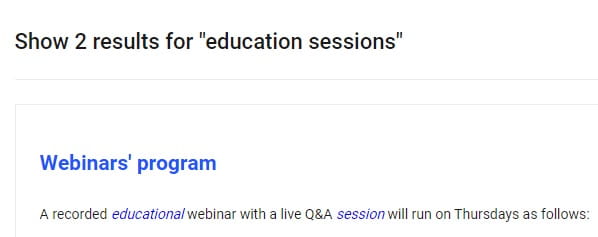
Sorl has out-of-the-box solutions for words stemming, but why it doesn`t work out-of-the-box in Sitecore and how to make it works?
First of all, lets find out why it doesn`t work. Let`s say we execute a search query for text field **content\_t**. Navigate to Solr admin pane, Schema tab, and select your field to see detailed information:
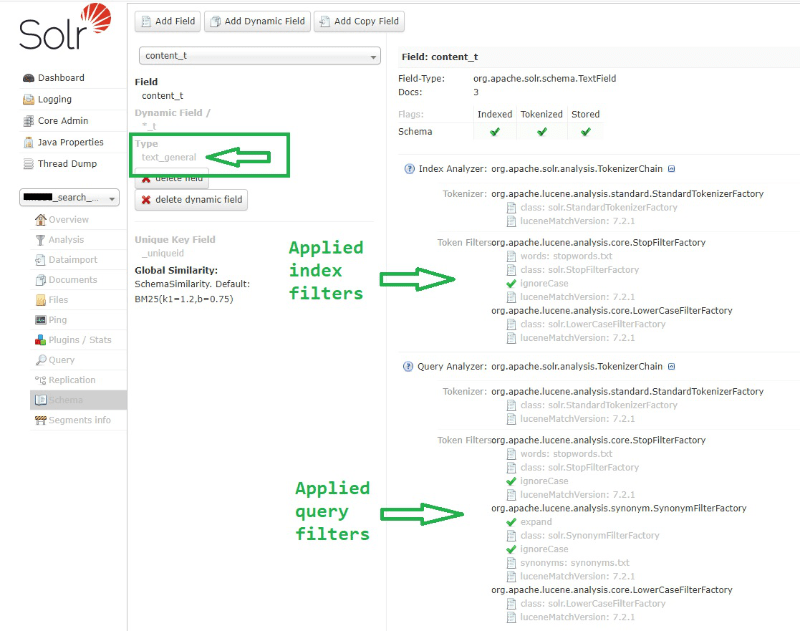
As you can see, field is mapped to *"text\_general"* type, and also there are NO ANY stemminq filters for index and query analyzers. Also you can see that there are language versions of your dynamic field that are mapped to corresponding language types, like *"text\_en"*, *"text\_de"* etc.:
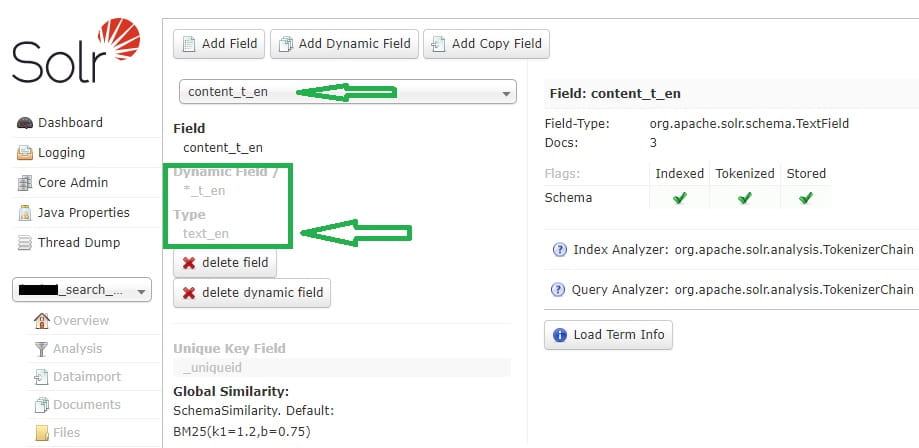
Let`s navigate to **managed schema** of our index to see what filters are applied to these field types:
```
...
```
As you can see each language version of field has its own stemmer in filters. But why stemming doesn`t work? First of all, *"text\_en"* dynamic field is mapped to *"text\_general"* type, but text\_general type doesn`t have any stemmers in analyzer filters by default:
```
...
```
#### Solutions
There are two ways to solve this problem and it depends on how your Solr search is implemented:
1. Your search is **Language specific**. It means that your search uses **CultureExecutionContext** and query hits to exact language version of field:
```
var results = context.GetQueryable(
new CultureExecutionContext(Context.Language.CultureInfo))
.Where(predicat);
or
var result = context.GetQueryable()
.InContext(new CultureExecutionContext(Context.Language.CultureInfo))
.Where(predicat);
```
In this way search query hits exact language version of field, like **content\_t\_de**, not **content\_t**.
In this case, all that you need is to **change** "\*\_t\_en" mapping to "text\_en" in managed schema and stemming starts to work:
```
```
2. If it is not possible for you to use **Language specific** search, you can map *"text"* field to *"text\_en"* type instead of default *"text\_general"* in managed schema:
```
```
Or you can add **PorterStemFilterFactory** filter to *text\_general* type in managed schema *(at least to query analyzer)*:
```
```
In this second case stemming works only for english content, because if you don`t have **Language specific** search, you query will always hit **content\_t** and only one english **PorterStemFilterFactory** filter will applied.
**Note:** be sure to restart Solr after schema changes and rebuild corresponging index.
**Tip:** Solr admin has *Analysis* tab where you can test configurations of your field types and see in real time how tokenizers and filters are applied to your queries at index and query time:
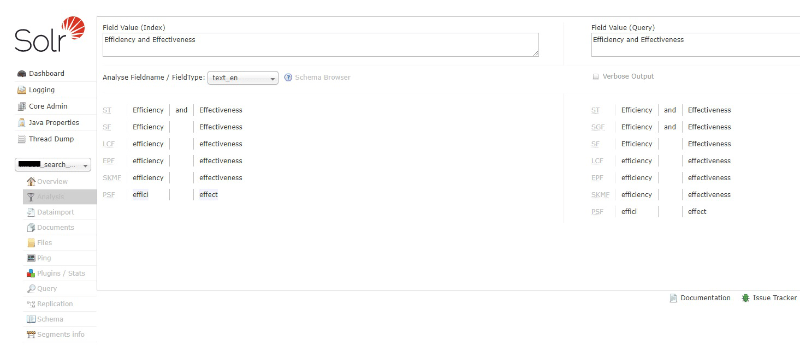
As you can see, Solr has powerful filters and analysers and you get more accurate language specific results only by small changes in configurations or your Sitecore queries. **Good luck!**
###### Author
[!\[sergey-200\](https://www.brimit.com/-/jssmedia/feature/blogs/authors/sergey-200.jpg?h=197&iar=0&w=200&hash=0D636570F87F1C13C39E06EB19D9DF06)
Sergey Baranov
Sitecore MVP/ Senior Sitecore Developer](https://www.brimit.com/blog/author?authors=Sergey%20Baranov)
#### More on Sitecore
[!\[How Vercel Will Help You Save Effort When Deploying Sophisticated Sitecore Projects\](https://www.brimit.com/-/jssmedia/project/brimit/blog/2024/vercel_cover-image.png)
#Guides#How-toDXPE-commerce
##### How Vercel Will Help You Save Effort When Deploying Sophisticated Sitecore Projects
Optimize and accelerate the development and deployment of complex multisite Sitecore projects.
Alexei Vershalovich on July 17, 2024](https://www.brimit.com/blog/how-vercel-will-help-you-save-effort-when-deploying-sophisticated-sitecore-projects)
[!\[Training Up Tomorrow's Sitecore MVPs: a Mentoring Success Story\](https://www.brimit.com/-/jssmedia/project/brimit/blog/2023/sitecore-mentoring---cover-image.png)
#How-toDXP
##### Training Up Tomorrow's Sitecore MVPs: a Mentoring Success Story
How to participate in the Sitecore Mentor program and help younger colleagues jump-start a career in Sitecore development.
Sergey Baranov on October 2, 2023](https://www.brimit.com/blog/training-up-tomorrows-sitecore-mvps)
[!\[Going Headless. Part 2: When a Headless CMS Is Your Best Bet (if you have Sitecore)\](https://www.brimit.com/-/jssmedia/project/brimit/blog/2022/headless/adobestock_456986731.jpg)
#How-toDXPE-commerce
##### Going Headless. Part 2: When a Headless CMS Is Your Best Bet (if you have Sitecore)
Discover how a headless CMS can benefit organizations that use Sitecore.
Daniil Raschupkin, Palina Trokhautsava on September 15, 2022](https://www.brimit.com/blog/going-headless-part-2-when-a-headless-cms-is-your-best-bet-if-you-have-sitecore)
