In this article, I explain how I extended Claude Code to work better with Sitecore XP.
TL;DR
The full setup (skills, scripts and hooks) - is in izharikov/sitecore-xp-skills.
Sitecore XP development with Claude
On its own, Claude Code already handles the codebase. But in comparison to a popular any open-source stack
Coding Agent has some limitations working with Sitecore XP:
- closed platform - no public source; behaviour is compiled into shipped assemblies
- limited public material - sparse docs and examples next to a stack like Next.js
- state lives in a database - content, templates and renderings reach Git only through serialization
- variety of configs - Sitecore ships with thousands of configuration files and settings, hard to locate without knowing where to look
Setup
CLAUDE.md
Claude Memory starts with the CLAUDE.md file. Keep it short, but enough for Claude Code to understand your project.
For a project CLAUDE.md I usually include this Sitecore-related information:
- Sitecore version and projects architecture (e.g. 10.4.1 and Helix)
- Serialization: Unicorn, Sitecore Content Serialization (SCS), TDS, etc.
- Code Generation tool: Leprechaun, T4-Templates, etc.
- Build Process: e.g. build script which Agent can run to verify work (or an explicit rule against running the build)
- Unit Tests policies
- General code rules important for each and every (or most) Claude Code sessions
Templates and renderings
I choose the following rule:
Every tool works on local files under version-control.
The alternative to a local skill is an MCP server wired to a live instance, like the Sitecore Community MCP server.
Skill vs MCP for Items Editing
| Skill | MCP | |
|---|---|---|
| Changes land in | source files under Git | the live instance |
| Review | diff in a pull request | none |
| Revert | like any other commit | manual fix |
| Sitecore running | not needed | required |
| Feedback loop | build and sync first | immediate |
Templates
Template creation is usually a manual process done in the Content Editor: here a developer adds the template, its sections, then every field, one by one.
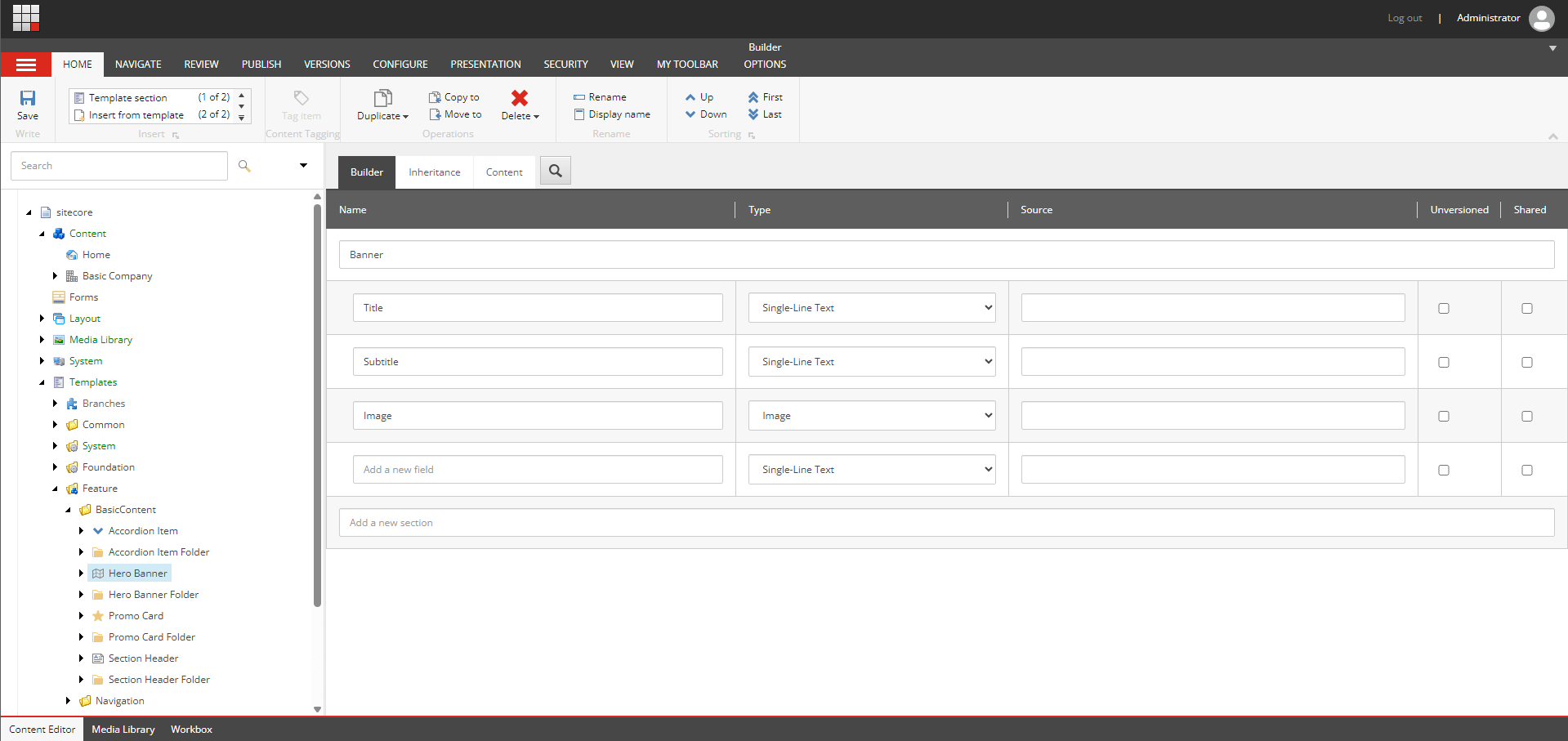
After that, Sitecore serializes it to files on disk, so it can be shared and deployed. For Claude Code I change the direction:
/sc-templateskill:Edit the YAML locally and sync it back into Sitecore, so a template change is a file change.
before (manual):  [developer]  Sitecore   -> serialize -> repository
now (automated):  [agent]      repository -> sync      -> Sitecore
To simplify the process and save tokens, it's wrapped into a PowerShell script call:
powershell -File .\.claude\skills\sc-template\Invoke-TemplateOp.ps1 -Json '{
  "operation": "create", "layer": "Feature", "module": "<ModuleName>",
  "templateName": "Article Page", "sectionName": "Data",
  "fields": [
    { "name": "Title", "type": "Single-Line Text" },
    { "name": "Body", "type": "Multi-Line Text" },
    { "name": "Summary", "type": "Multi-Line Text" }
  ]
}'
And skill is calling it:
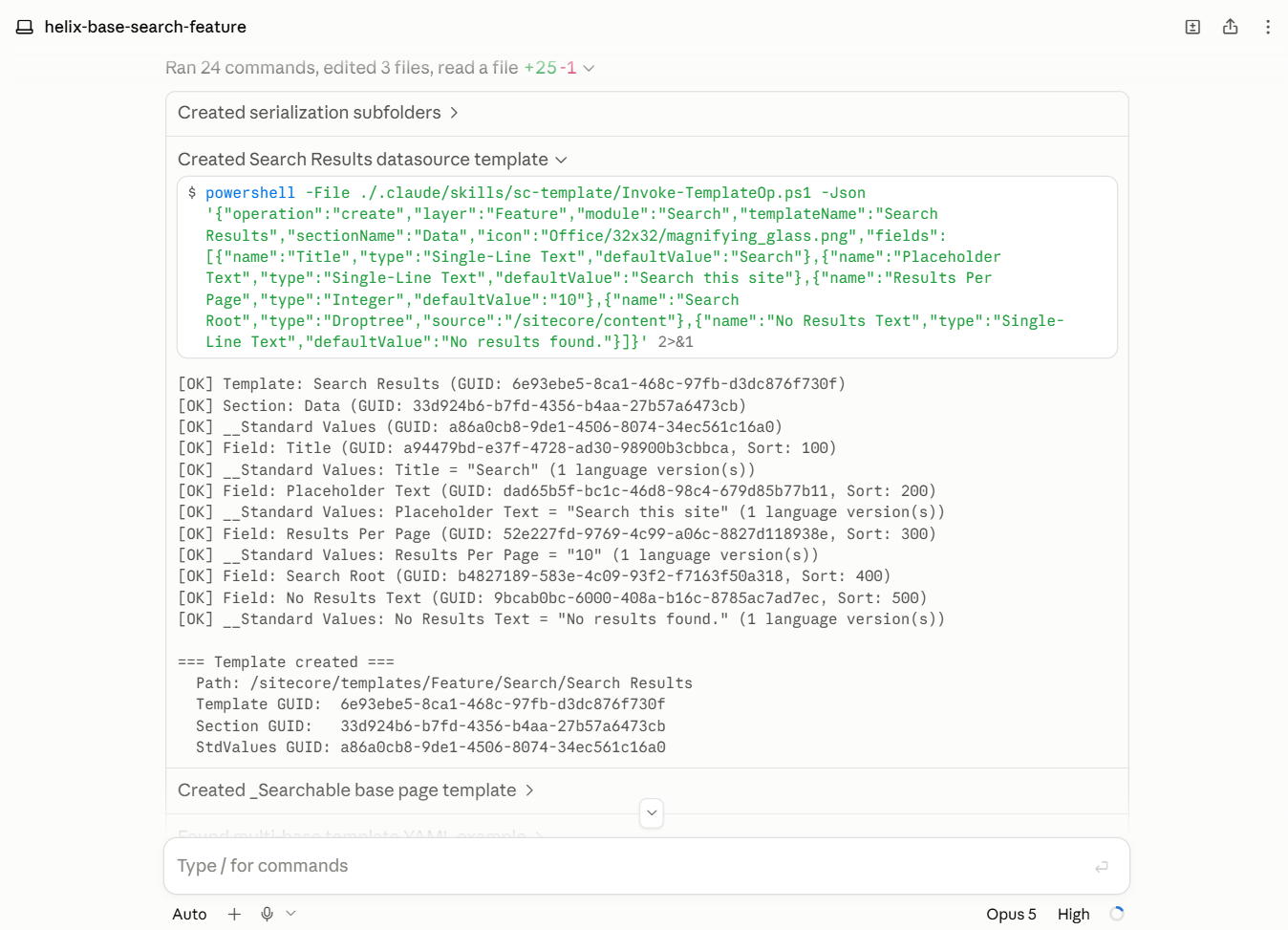
Note: Unicorn and SCS both work here - only the file format changes.
Renderings
Creating a rendering touches even more places than a template. By hand the routine is:
- add the rendering item
- point it at a datasource template
- register it on the placeholders it is allowed in
- write the controller action
- write the Razor view
Five manual edits across the Content Editor and the codebase, and they all have to line up.
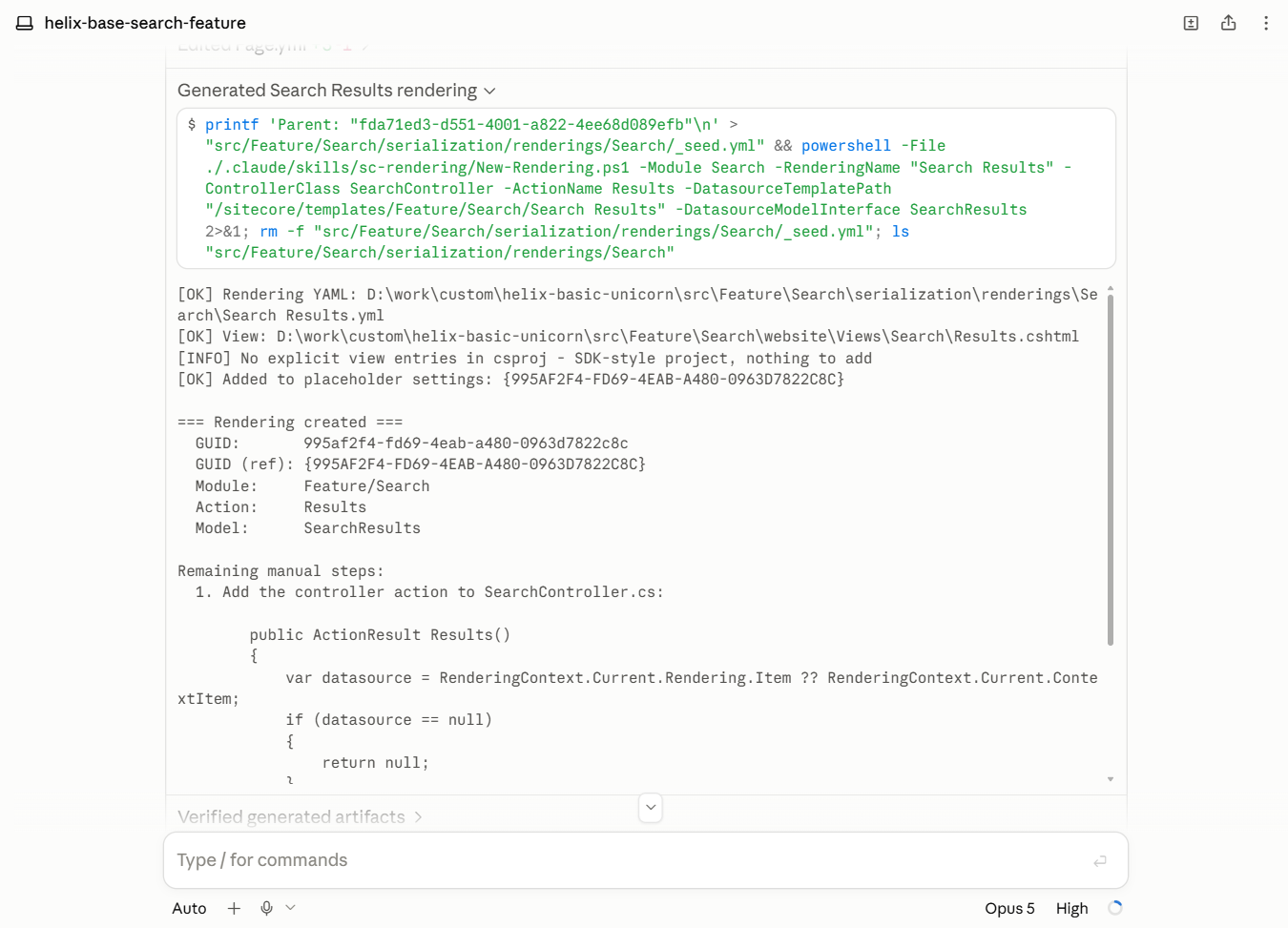
For Coding Agent I choose a similar approach to templates:
/sc-renderingskill:To create rendering do all the steps locally (file edits) then deploy code and sync Unicorn to have the Sitecore rendering ready.
powershell -File .claude/skills/sc-rendering/New-Rendering.ps1 -Module Accordion `
  -RenderingName "Accordion Container" `
  -ControllerClass AccordionController -ActionName Container `
  -DatasourceTemplatePath "/sitecore/templates/Feature/Accordion/Accordion Container" `
  -DatasourceModelInterface IAccordionContainer
Content Editing
Content editing itself I do not automate yet. The same serialization approach applies (edit yaml file locally for page/datasource and sync), or an MCP server against a running instance, like the Sitecore Community MCP server.
SPE scripting with an LLM
Sitecore PowerShell Extensions (SPE) is a popular addition to the platform, used widely. And of course Coding Agent can generate SPE scripts.
While in most cases it works, sometimes Agent hallucinates: SPE is very similar to PowerShell, so LLM starts 'guessing' names and parameters. The cmdlets read like ordinary PowerShell but are a separate set, so it writes a plausible name or parameter that does not exist. There is no compile step - the script fails only when it runs in a Sitecore instance.
/speskill:Verify PowerShell commands and parameters against existing documentation.
SPE documentation is comprehensive and easily machine-accessible in markdown format:
https://doc.sitecorepowershell.com/appendix/<category>/<lowercase-command>.md
| Without Skill | With Skill |
|---|---|
| ⚠️ Issues | ✅ Works |
- Full name is not set
- To set profile properties -Authenticated is required
|
- Full name is set
- Uses -Authenticated
|
powershell
            # --- Create user ---
            New-User -Identity $username -Enabled $true `
            -Password $password -Email $email
            # --- Set profile properties ---
            $user = Get-User -Identity $username
            $user.Profile.FullName       = $fullName
            $user.Profile.ClientLanguage = $clientLanguage
            $user.Profile.Save()
|
powershell
            $user = New-User -Identity $domainQualifiedName -Enabled `
            -Password $password -Email $email -FullName $fullName
            $user = Get-User -Identity $domainQualifiedName -Authenticated
            $user.Profile.ClientLanguage = $clientLanguage
            $user.Profile.Save()
|
Sitecore XP Platform
Not every Sitecore internal is searchable in the docs. Some answers - which processors a pipeline runs, what a setting defaults to - live only in the shipped configuration, and none of that is on the public web.
Checking it usually means visiting /sitecore/admin/showconfig.aspx and searching for the required pipeline/config (but often it's unclear what to search for). But if unzip Sitecore installation locally and give access to Claude Code - it can grep it for us.
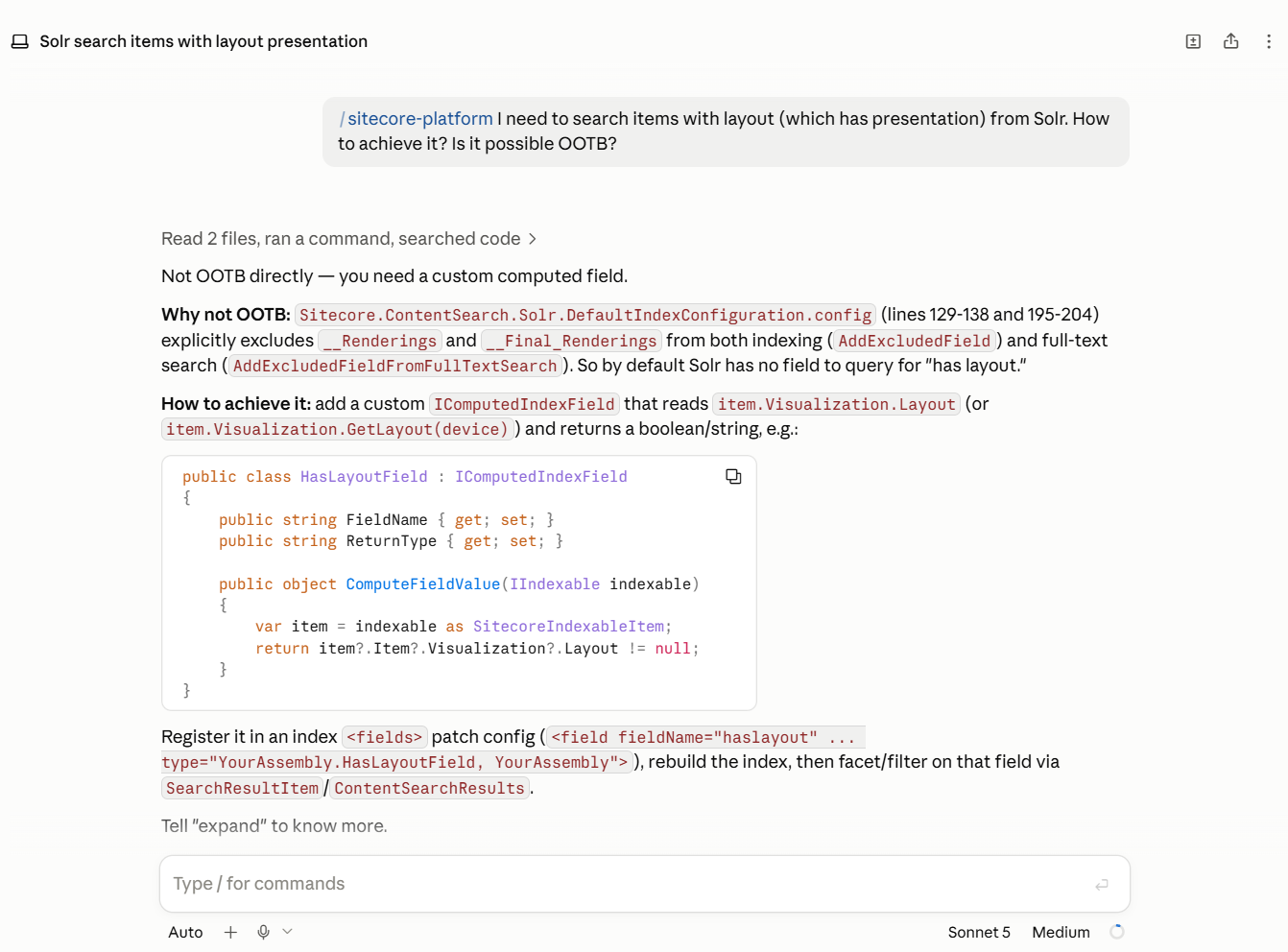
/sitecore-platformskill:Access to a Sitecore installation: browse all configs, XMLs, DLLs as its source code.
Example. Validate if it's possible to find page items (with presentation) from search index.
DLL decompilation
A developer who wants to know how a library really works decompiles it - Rider does it on a click, Visual Studio with ReSharper too.
ILSpy is the open-source decompiler behind that idea. It
ships a command-line tool, ilspycmd, that turns a compiled assembly back into C# and prints it -
no GUI, no project loaded:
dotnet tool install -g ilspycmd
ilspycmd path/to/Library.dll
I wrapped that in a skill: Claude runs it against an assembly and reads the source.
/ilspy-decompileskill:Understand internals of the system by decompiling DLLs.
Note: check the license of the assembly before you decompile it. Terms differ per vendor, and for a commercial product they usually restrict reverse engineering.
Hooks
CLAUDE.md and every loaded skill add to the context on every request. Consider wrapping anything deterministic into hooks.
| Extension | What for |
|---|---|
| CLAUDE.md | a judgement the model makes every session |
| Skill | a multi-step operation, loaded only when needed |
| Hook | anything a machine can check or fix |
Formatting is the clearest case. The rules are already in .editorconfig; a hook reapplies them
after each write - no added context, and it can't be skipped.
Conclusion
Claude Code already works with the Sitecore XP codebase.
With skills it's more predictable and has better Sitecore context.
Templates, renderings, and Sitecore internals follow the same shape:
- templates and renderings go through a skill
- SPE cmdlets get checked live against the documentation
- agent has access to Sitecore internals
If you have built something similar for your Sitecore solution, or found a better shape for any of these skills, let me know (email me or find me in Sitecore Slack).