Introduction
There's a common way to optimize the startup of your Sitecore XP website: precompile the views with RazorGenerator.MsBuild.
It can really speed up the startup time of your website. And there are already plenty of articles how to implement it in Sitecore application:
- Precompiled Razor Views by Ian Jones.
- Precompiled Views and Custom Theme Engine for Sitecore by José Neto.
- Sitecore 9 View Precompilation by Olivier McNicoll.
- Precompiled Views with Sitecore 8.2 by Kam Figy.
I followed the approach described in all the articles, but there were some adjustments required to make it all working in our project.
So I decided to share my findings with you. Here you will find all the steps required to make Sitecore XP MVC Views Precompilation work in your project.
Steps
The steps are pretty easy:
1. Add RazorGenerator.MsBuild NuGet package
First of all, you need to add the RazorGenerator.MsBuild NuGet package to your projects.
In all your projects (.csproj) where you have .cshtml files, add the following line:
<PackageReference Include="RazorGenerator.MsBuild" Version="2.5.0" PrivateAssets="all" />
Note: We use Packages.props file with Microsoft.Build.CentralPackageVersions package in our solution, so we added it as this:
Packages.props
<ItemGroup>
    <!-- ... Other imports ... -->
    <PackageReference Update="RazorGenerator.MsBuild" Version="2.5.0" />
</ItemGroup>
.csproj file
<ItemGroup>
    <!-- ... Other imports ... -->
    <PackageReference Include="RazorGenerator.MsBuild" />
</ItemGroup>
2. Sitecore settings
Ensure Mvc.UsePhysicalViewsIfNewer Sitecore setting is set to true for production environment. But for development environment it should be set to false (so you can upload updated views to the server, so changes will be reflected immediately).
Notes
That's the way you can make Sitecore XP MVC Views Precompilation work in your project. But there are some potental issues that you should be aware of.
If web.config namespaces are not working
You can define default namespaces for your views in the Views\web.config file: more details. E.g.:
<?xml version="1.0"?>
<configuration>
  <!-- ... -->
  <system.web.webPages.razor>
    <!-- ... -->
    <pages pageBaseType="System.Web.Mvc.WebViewPage">
      <namespaces>
        <add namespace="System.Web.Mvc" />
        <add namespace="System.Web.Mvc.Ajax" />
        <add namespace="System.Web.Mvc.Html" />
        <add namespace="System.Web.Routing" />
        <add namespace="Sitecore.Mvc" />
        <add namespace="Sitecore.Mvc.Presentation" />
      </namespaces>
    </pages>
  </system.web.webPages.razor>
  <!-- ... -->
</configuration>
But it may happen it won't work with Views precompilation because of Razor implementation details.
If it doesn't work and you get compilation errors, you can try to add the following line anywhere in .csproj file:
<!-- System.Web.Mvc, Version=5 -->
I descibed this in RazorGenerator Github issue: #211.
The full working import in csproj file:
<ItemGroup>
    <!-- ... Other imports ... -->

    <!-- System.Web.Mvc, Version=5  DO NOT REMOVE: razorgenerator picks this up as an mvc project -->
    <PackageReference Include="RazorGenerator.MsBuild" />
</ItemGroup>
Duplicated views in Solution Explorer
I faced the following issue: all the views were shown multiple times in the Solution Explorer.
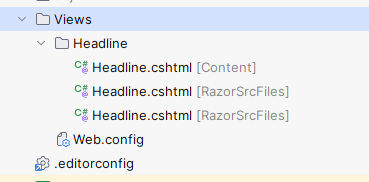
If you also have duplicated views in Solution Explorer (like I had in Rider), you can disable precompilation by default, but enable it only when you deploy the solution to the server.
I used Directory.Build.props file in the root of the solution to achieve this:
<Project>
    <!-- this is used to hide duplicated items in the solution explorer -->
    <PropertyGroup>
        <PrecompileRazorFiles Condition=" '$(PrecompileRazorFiles)' == '' ">false</PrecompileRazorFiles>
    </PropertyGroup>
</Project>
This will disable precompilation by default, but when the solution is deployed, it should be enabled.
- If you are using
msbuildcmd to deploy, pass this param to it:/p:PrecompileRazorFiles=true - or with
.pubxmlfile:<Project> <PropertyGroup> <PrecompileRazorFiles>true</PrecompileRazorFiles> </PropertyGroup> </Project>
Results
Enabling views precompilation significantly reduced the startup time of the website (in all environments: local, dev, staging, production).
Here are some examples of the startup times:
- PROD CM now: 77 sec, before: 669 sec
- PROD CD now: 165 sec, before: 1094 sec
As you can see, precompilation really improved performance of the website. If you are not using it already - you should try it out.